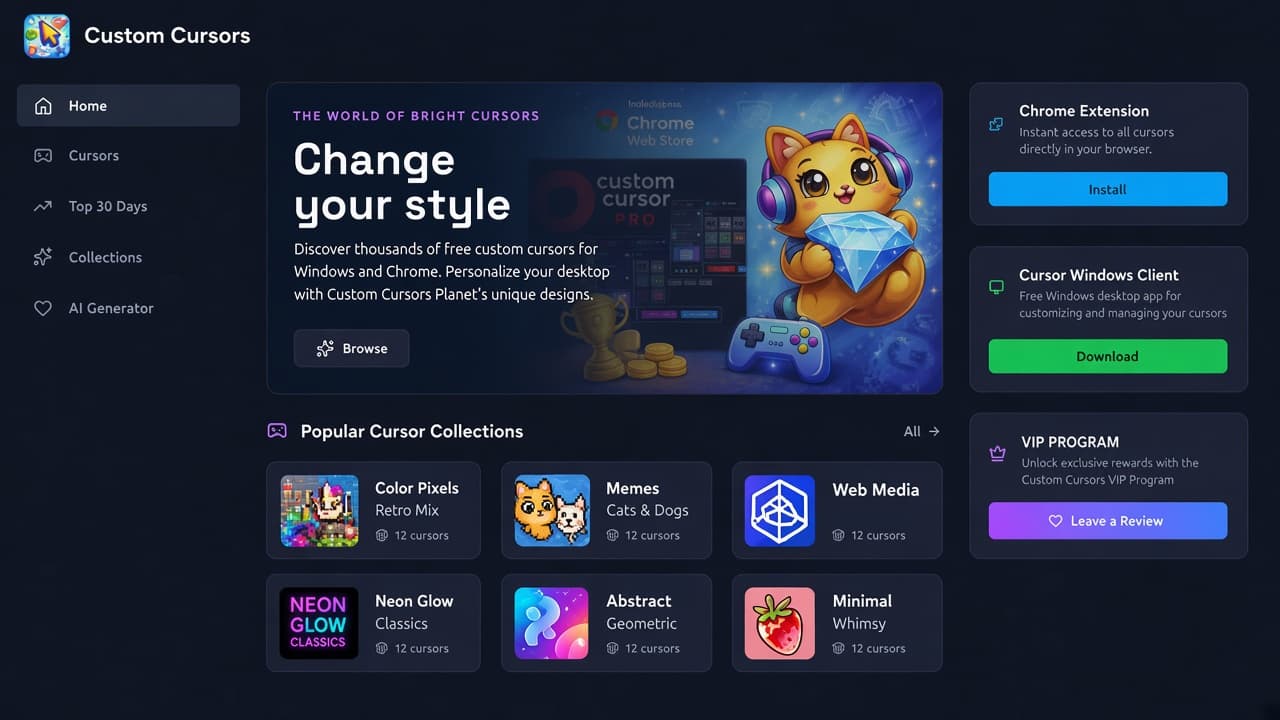
The Custom Cursors Planet website at custom-cursors.com is a full catalog for free and premium mouse cursors, not a one-page Chrome Web Store listing. The live title is Custom Cursors Planet | Free & Premium Mouse Cursors. The hero line is The world of bright cursors, then Change your style, with copy that promises thousands of free custom cursors for Windows and Chrome.
This article is a dedicated walkthrough of that catalog as of October 2026: Home, Cursors, Top 30 Days, Updates, Collections, Favorites, VIP Club, Bonuses, AI Generator, Create Cursor, Customizer, Chrome Extension, and the Windows client. It is not a roundup of other cursor sites. It is also not a review of Cursor Helper, custom-cursor.world, Cursor Custom, or Custom Cursor App. Those are separate products with their own pages.
If you are comparing pointer themes in general, start from AddonUp custom cursors. Below we stay on Planet.
What you land on at custom-cursors.com
The homepage is a dark navy dashboard. A left rail lists Home, Cursors, Top 30 Days, Updates, Collections, Favorites, VIP Club, Bonuses, and AI Generator, plus Support and About Us. The top bar has theme toggle, login, and a bright Install Extension button. The right column repeats three product cards on almost every page:
- Chrome Extension: Instant access to all cursors directly in your browser, with Install.
- Cursor Windows Client: Free Windows desktop app for customizing and managing your cursors, with Download.
- VIP PROGRAM: Unlock exclusive rewards with the Custom Cursors VIP Program, plus Leave a Review.
Hero art on Home shows a headphone cat holding a crystal next to a Custom Cursor Pro mock and a Chrome Web Store badge. A Browse button sits under the pitch. Under the fold you get Popular Cursor Collections, Top Downloaded Cursors, and Fresh Cursors. Footer tools list Create Cursor and Customizer. Downloads list Chrome Extension and Windows App.
Browse all cursors
Open All Cursors when you want the full grid. The H1 is Browse All Cursors, with Search, filter, and find the perfect cursor for you. There is a Search Cursor field, a Filters control, an All collections dropdown (hundreds of named collections, including Starter, Color, Holidays, Animals, Lifestyle, Sport, Food & Drinks, Job, and many franchise-style labels), and sort options: New ones first, The most popular, and By name (A-Z).
Each pack card shows a two-tile preview (usually an arrow plus a pointer or character sticker), a collection chip, a short blurb, a download count, a star rating, and Add to favorites. Pagination runs across several pages. Treat licensed-looking names as fan-art listings, not official merch. The site says that in the footer and on the disclaimer page.
Popular collections and the collections library
Home highlights six Popular Cursor Collections (about 12 cursors on each card when we visited):
- Color Pixels Retro Mix: Retro pixel arcade, 8-bit blends, and vintage pixel art custom cursor pointer packs.
- Memes Cats & Dogs: Pop Cat, Bongo Cat, Cheems, and animal meme custom cursor pointer packs for pet humor fans.
- Web Media: Iconic Web Media custom cursor packs featuring YouTube, Chrome, Netflix, Instagram, TikTok, Spotify, Google, and Amazon.
- Neon Glow Classics: Classic neon glow, sparkle, rainbow, and radiant custom cursor pointer packs for everyday browsing.
- Abstract & Geometric: Starter favorites custom cursor pointer packs.
- Minimal Whimsy Collections: Whimsy mixes, cute minimal lite, and curated minimal custom cursor pointer packs for fun tabs.
The full directory lives at Cursor collections. Headline: Browse themed cursor sets for every taste. Search Cursor Collections, Apply Filters, and Reset sit above a cover grid. When we loaded the first page, tiles included Fandango, Letter Cursors, Cute Rocket Cursors, Voxel Critters, Voxel Bees, Spiral Crystal Wands, Blush Blobs, Bubble Arrows, plus many mix packs. Some covers use well-known entertainment brands. Planet does not claim those as official products. Pagination went at least to page 5.
Top downloaded, Top 30 Days, and fresh cursors
Home Top Downloaded Cursors is a popularity strip. On our visit it included Cute Glassy Cherry Strawberry Cursor, Kawaii Bunny Bear Lollipop Cursor, Molang Chilling Bed Phone Cursor (the site itself labels that a fanart set), Pororo Loopy packs, Fluids and Lights Cosmic Rays Light Cursor, Color Light Apricot Orange Cursor, and Adventure Time Finn Jake Running Cursor (again labeled fanart). Download counts on those cards were in the tens, not millions, so treat them as a current ranking, not a lifetime chart.
Nav Top 30 Days uses the H1 Top Cursors - Last 30 Days. Subcopy: Cursor packs added in the last 30 days, ranked by downloads. That is a recency-plus-downloads view, not an all-time hall of fame.
Home Fresh Cursors matches the newest grid: slime, spider, and eyeball Halloween-style packs, Zuma-style anchor pups, YEET/OOF cubes, and mallet avatars. Latest updates groups New Collections and Latest 30 Cursors. Updates Log is the changelog-style view from the same family.
Chrome extension and Windows client
Planet is built as a two-client catalog. The Chrome CTA on the site points at Chrome Web Store ID lnomgbjjbdkllphjiilieifkbiohlpah. Open the Install Extension listing from Home if you want the pointer in the browser. Hero art on the site references Custom Cursor Pro. That listing is the site's own install path. It is not Cursor Helper, Cursor Custom, or Custom Cursor App.
The Windows card is labeled Cursor Windows Client: a free desktop app for customizing and managing cursors. Download goes to the site's cursorchanger.zip on the Cute Cursors CDN. Install desktop software only from that official Download control, then keep Windows SmartScreen in mind like any unsigned utility.
VIP Club and daily bonuses
Open VIP Membership for Get VIP Status. Pitch: exclusive cursors, a unique profile badge, and early access to new releases (the page says 7 days earlier than other users). Why Choose VIP lists Exclusive Cursors, Early Access, and VIP Badge. Exclusive for VIPs showed mixed Free/VIP examples such as Stylish Modern Black, Classic Black, Google Play, and Blue Modern, with large lifetime download counts on those older packs.
Become a VIP Member copy asks you to support the project. FAQ on that page covers how access starts after payment, one-time lifetime vs monthly/yearly, cancel-anytime until the period ends, a 30-day money-back note, and where the badge appears (profile, comments, community). Pricing widgets can change, so confirm the live checkout, not this article.
Nav Bonuses opens Daily Bonus: Come back every day to claim a free exclusive cursor or loyalty points, with Claim Reward and a Possible Rewards list. Favorites is the logged-in heart list from pack cards.
AI Cursor Generator
Nav AI Generator is AI Cursor Generator. Headline: Transform text into a unique cursor using artificial intelligence. Just describe your idea, and our system will bring it to life. Guest credits showed 10, with Top up. You type a prompt (placeholder examples: fiery sword, crystal snowflake, cyberpunk eye), pick Pixel Art, Cartoon, or Realistic, then Generate (1 credit). View History sits under the button. The empty state says Your ideas are waiting to come alive.
Generate stays disabled until you type a prompt. Treat output as user-made art you still need to check against the site's fan-art rules before you publish or install it.
Create Cursor and Customizer
Footer Tools Create Cursor goes to Creative Studio. The studio pitch is Unleash your imagination and create unique pixel cursors from scratch. When we opened it, the page also showed Page Under Development, with Leave a Review and Get VIP Access as interim CTAs. Do not plan a pixel-editor session on that URL until the overlay is gone.
Footer Customizer is live as Cursor Constructor. Copy: Build a custom pack in three steps: pick Arrow, pick Pointer, then save to Chrome or Windows. Workspace explains that Arrow and Pointer apply together as one pack. Active slots let you click to select, with Add to Chrome plus Windows and extra action buttons. Cursor library lets you search and pick a style for the active slot. The library we saw reused catalog art (orbs, spiders, anchors, cubes) as mix-and-match parts.
Fan art, user uploads, and trademarks
Every page footer repeats: All materials on this website are user-generated and uploaded by third parties. Custom Cursors Planet does not create, endorse, or assume responsibility for any user-uploaded content. Product names, logos, characters, brands, and trademarks mentioned or depicted are the property of their respective owners and are used for identification purposes only. No affiliation or endorsement is implied.
The Disclaimer (last updated October 14, 2025 on the page we read) is stricter: images are fan art or collected from freely available sources. Nature of Content says cursors, collections, icons, and images are community fan art. Rights stay with original owners. Software (extensions and desktop apps) is used at your own risk. Use character packs as unofficial fan work, never as official branded products.
How to use the site in practice
- Start on custom-cursors.com and Browse, or jump to Cursors / Collections.
- Shortlist with Top 30 Days, Fresh Cursors, or a named collection. Heart Favorites if you have an account.
- Install the Chrome listing from Install Extension, or download the Windows client from Download.
- Mix parts in Customizer, or try AI Cursor Generator if you want a prompt-based pointer.
- Skip Create Cursor until Creative Studio is no longer marked under development.
- Read Disclaimer before you treat any franchise name as official.
Custom Cursors Planet vs similar catalogs
Planet, Cursor Helper, and custom-cursor.world all look like dark cursor dashboards with collections and constructors. Use the domain. Planet is custom-cursors.com. Cursor Helper is cursor-helper.com. Custom Cursor World is custom-cursor.world. Chrome store IDs also differ. If an AddonUp extension card names a different ID, it is not this site's Install button.
FAQ
Is this only a Chrome extension?
No. The website is the catalog. Chrome Extension and Cursor Windows Client are the two install paths advertised on every page.
Are top packs official character products?
No. Planet labels many as fanart and states all materials are user-generated. Names of games, cartoons, and brands identify the look, they do not mean a license.
Can I make my own cursor today?
Customizer (Cursor Constructor) is the working mixer: Arrow, Pointer, Save. AI Cursor Generator is the prompt tool with credits. Create Cursor / Creative Studio was still under development when we checked.
Do I need VIP?
Free browsing and the Windows/Chrome CTAs are on the public site. VIP is for exclusive packs, a badge, and earlier releases. Daily Bonus is a separate loyalty loop.
Ready to browse? Open Custom Cursors Planet, then pick a collection or the constructor. For more pointer extensions on AddonUp, stay in custom cursors.