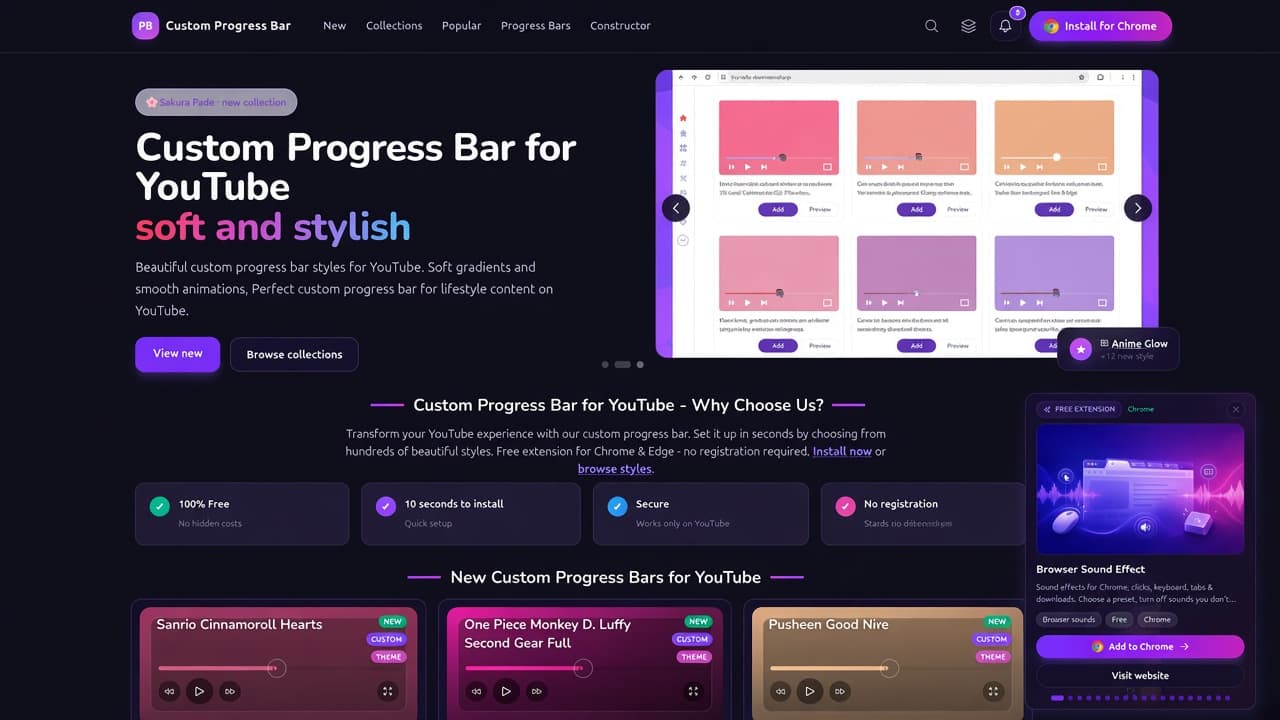
The Custom Progress Bar website is a YouTube-only catalog of progress bar themes, not a generic idle-game hub and not a cursor shop. On custom-progressbar.com you browse 200+ styles, open New, Collections, Popular, and Progress Bars, then design your own look in Constructor. The live page title is Custom Progress Bar for YouTube | custom-progressbar.com.
This is a dedicated walkthrough of the catalog as of October 2026. For the matching Chrome listing on AddonUp, see Custom Progress Bar for YouTube. That extension page is the AddonUp counterpart of this site, not a Sweet Progress Bar clone and not a Cursor Helper or trail article.
What the site is
The homepage hero currently reads Custom Progress Bar for YouTube with the line soft and stylish. Supporting copy talks about beautiful custom progress bar styles, soft gradients, and smooth animations, and calls out lifestyle content on YouTube. Primary actions are View new (Latest) and Browse collections. A carousel of theme cards shows Add and Preview, plus chips such as Anime Glow with new styles.
Top navigation is stable: New (/latest), Collections (/collections), Popular (/tops), Progress Bars (/progress-bars), and Constructor (/configure). Search, a color-theme switcher, notifications, and Install for Chrome sit on the right. Footer Discover links repeat Progress Bars, Collections, Tops, Latest, and Tags. Product links include Install, Configure, Manage progress bars, Demo, and Products.
Why the homepage says you should use it
A Why Choose Us block sits under the hero. The pitch: transform YouTube by picking from hundreds of styles, with a free extension for Chrome and Edge and no registration. The four cards are:
- 100% Free - no hidden costs.
- 10 seconds to install - quick setup (the broader product story also uses a 10-second setup).
- Secure - works only on YouTube.
- No registration - start instantly.
Lower on the same page, four more product promises: a massive library of styles created by the community, easy browser integration (install the extension and activate a style in a few clicks, no coding), a creative community of designers who share looks, and a powerful editor with live preview and precise controls.
New bars on Latest
Nav New opens Latest. The H1 is Latest Custom Progress Bars for YouTube. Copy invites you to browse newest bars, fresh collections, and updates for Chrome and Edge. A Rate us panel sits beside Explore Collections. Below that, new collection tiles (examples on our visit: Indie Horror Games, Cuphead and Pizza Tower, Nintendo Classics) then individual new bars.
The homepage New grid we captured included fan-art and user-generated themes such as Sanrio Cinnamoroll Hearts, One Piece Monkey D. Luffy Second Gear Full, Pusheen Good Night, Molang Evolves into Pokemon Pikachu, Minecraft Pixel Steve Walking, Demon Slayer Tanjiro Kamado Circle Of Fire, Marvel Chibi Black Panther, Super Mario Pixel Running, and Chikn Nuggit Sody Pop. Cards use NEW / CUSTOM / THEME badges, Add and View, and short bios that often say fanart. These are community themes, not official products from those franchises.
Popular bars on Tops
Nav Popular is Tops, titled Top Custom Progress Bars for YouTube. The hero talks about popular styles, trending designs, and themed collections, and the free Chrome and Edge extension. Buttons: See all popular, Latest added, Collections.
On both the homepage Popular block and Tops, the same six community favorites led the list on our visit (install counts shown on the homepage cards):
- Nyan Cat Meme - pixel cat with a rainbow trail; tags Memes; about 251,900 installs on the card.
- Hello Kitty Wink - Sanrio-inspired wink theme; Love / White; about 181,196 installs.
- Swimming Corgi Dog - cute animal bar; Cute / Animals; about 155,971 installs.
- Mario Super Mushroom - game-inspired mushroom scrubber; Games; about 138,954 installs.
- Sonic the Hedgehog - the listing itself calls it a fanart custom progress bar; Games / Lightning; about 130,658 installs.
- Pixel Heart - simple love/red heart; about 107,918 installs.
Treat every named character as unofficial fan art or user-generated theming. Custom Progress Bar does not claim those brands.
Collections
The Collections index H1 is YouTube Progress Bar Collections. Copy says collections are curated by theme, style, or category so you can match a channel or project. Filters: search by name or description, sort (Name A-Z through recently updated), per page 12/24/36/48. Pagination was live (page 1 of several) with 24 tiles at the default size.
Examples called out on the homepage collections strip: Demon Slayer: Kimetsu no Yaiba (Nezuko, Tanjiro, Inosuke, Sabito - anime emotion), Musicians and Singers (Billie Eilish, BTS, Taylor Swift, Gorillaz), and Sanrio (Hello Kitty, Cinnamoroll, Kuromi, My Melody - daily kawaii). The full grid also listed Adventure Time, Among Us, Animals, Anime, Brawl Stars, Cartoons, Cookie Run, Cuphead and Pizza Tower, Cute, DC Comics, FNaF, Friday Night Funkin', Games, Genshin Impact, Gravity Falls, Harry Potter, Holidays, Indie Horror, K-Pop, Kirby, Marvel, Memes, Minecraft, and more. Each tile shows an item count and View.
The Progress Bars library
Nav Progress Bars opens All Progress Bars. Title in the tab: YouTube Progress Bars Catalog. The page can render in a light theme: search (press / to focus), sort Newest first, per page, extra Filters. Intro copy describes a complete catalog from minimal to animated styles and says you can filter by collections, tags, or name. Cards match Latest (preview player, Add, View, tags). This is the full library behind the 200+ styles claim; the catalog text even says thousands of unique designs, so treat 200+ as the marketing floor, not a hard cap.
Constructor and live preview
Constructor is Create or edit a custom progress bar at /configure (tab title: YouTube Progress Bar Style Builder). Modes: Light (fast), Simple (more control), Pro (full control). Controls we saw in Light: Reset, Light, Save, Save As.
Progress bar settings let you pick solid or gradient, two colors (defaults around #D15B8C and #FAB4D5), angle, Reverse and Swap, presets, slider glow, slider height (7 px on our visit), hover progress light, and chapter hover background.
Scrubber settings cover color, a custom image (Upload, Gallery, or None; PNG/SVG/JPG converted to Base64; auto-fit size and bottom position), size, position X/Y, glow, and visibility. Preview on the left asks you to install the extension to preview. A note says the feature is in Beta and asks for a five-star review. That matches the site's claim of an editor with live preview: preview is tied to the installed extension, not a fake standalone player.
Chrome, Edge, YouTube only, no account
Install CTAs throughout the site point at Chrome (Chrome Web Store listing Custom Progress Bar for YouTube, ID nbkomboflhdlliegkaiepilnfmophgfg) and a matching Install for Edge path. The Why cards and FAQ-style secure line state the extension works only on YouTube. There is no registration wall to browse the catalog or start: pick a style, install, add the bar.
AddonUp lists the same product at Custom Progress Bar for YouTube under extensions. Use that page if you want store context beside this catalog tour.
Fan art, user-generated files, and legal
The footer on every page we opened says: all materials are user-generated and uploaded by third parties; Custom Progress Bar does not create, endorse, or assume responsibility for user-uploaded content; materials may be unofficial fan art; product names, logos, characters, brands, and trademarks belong to their owners and are used for identification only; no affiliation or endorsement is implied. Copyright line: 2026 Custom Progress Bar. Tagline: Personalize your YouTube player.
Legal docs live under Legal Documents (Privacy, Extension Privacy, Terms, Cookie Policy, GDPR, Disclaimer). Extension Privacy is described as the Chrome Web Store privacy policy covering local storage, permissions, and Limited Use. Support contact on the legal hub: [email protected]. This article is a catalog tour, not legal advice; read those pages before you upload or install.
Where to start
- Open custom-progressbar.com and skim Why Choose Us.
- Install for Chrome or Edge from the header or Install.
- Pick a path: New, Popular, Collections, or the full Progress Bars library.
- Click Add on a card, or open Constructor at /configure if you want a custom gradient and scrubber.
- Reload YouTube so the bar can attach. Remember: YouTube only.
FAQ
Is Custom Progress Bar free?
Yes. The homepage states 100% Free with no hidden costs, a free Chrome and Edge extension, and no registration.
How fast is setup?
The Why row says 10 seconds to install (quick setup). After install, add a style from the catalog and refresh YouTube.
Does it run on every website?
No. Secure copy says it works only on YouTube. That is the product scope.
Are Nyan Cat, Hello Kitty, Mario, and Sonic official?
No. Those are fan-art or user-generated themes in the catalog. The footer disclaims affiliation. Use them as community cosmetics, not licensed merch.
Can I design my own bar?
Yes. Constructor (/configure) has Light, Simple, and Pro modes, color/gradient controls, scrubber upload, and a live preview that wants the extension installed. It is labeled Beta.
Start on custom-progressbar.com or the AddonUp extension page Custom Progress Bar for YouTube.