Browser Sound Effect Chrome extension icon

Browser Sound Effect - Just for Fun

Sound effects for Chrome: clicks, keyboard, tabs, and downloads. Choose a preset, preview sounds, and turn off events you do not want.

2026
Launched
Verified & Safe to Install
addonup.com/extensions/browser-sound-effect
Browser Sound Effect promotional banner with sound wave graphic and clicks keyboard tabs downloads tagline

About This Extension

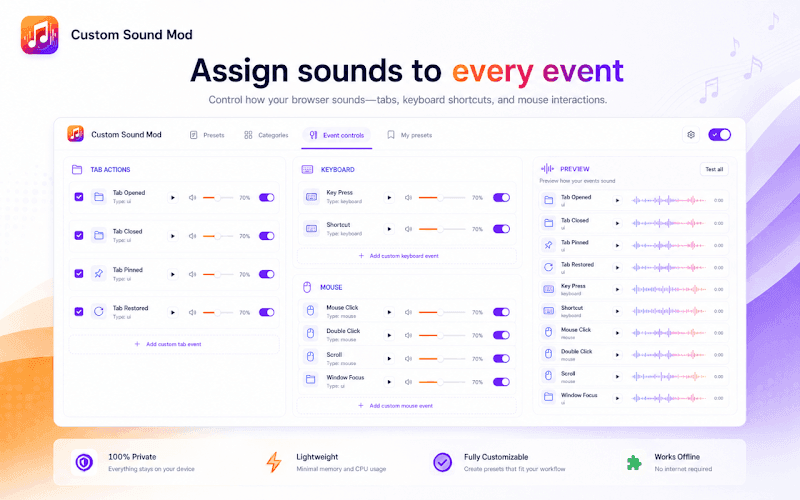
Browser Sound Effect adds short, optional audio feedback to everyday browsing in Chrome. Hear clicks, keyboard rows, tab changes, and downloads - or switch them off one by one without losing your preset.

Pick a themed preset for gaming, anime, music, or everyday browsing. Preview every sound in the popup, adjust volume in seconds, and build fully custom packs with the preset editor on the options page.

Why choose Browser Sound Effect?

  • Themed sound packs: Switch between gaming, anime, music, and everyday presets from the toolbar popup.
  • Per-event control: Enable or disable clicks, tabs, keyboard keys, and downloads independently.
  • Custom preset editor: Upload MP3, WAV, or OGG clips, trim them, and map audio to browser events locally.
  • Master volume and preview: Test each sound before browsing and adjust volume without opening settings.
  • Private by design: No account, cloud sync, or ads - presets and uploads stay on your device.

Install Browser Sound Effect in Chrome, pick a sound pack, and make everyday browsing more fun with optional audio cues you control.

About Browser Sound Effect

What is this extension?

Sound effects for Chrome: clicks, keyboard, tabs, and downloads. Choose a preset, preview sounds, and turn off events you do not want.

Key Features

This extension provides a range of features designed to improve your productivity and browsing experience. Whether you're looking to enhance functionality, improve security, or add new capabilities to your browser, Browser Sound Effect has you covered.

How to Install

Installing this extension is quick and easy. Simply click the 'Install Extension' button above, and the extension will be added to your browser automatically. You can start using it right away.

All extensions in our collection are safe to install and have been reviewed for quality and security. You can manage your installed extensions through Chrome's extension management page.

Frequently Asked Questions

What is Browser Sound Effect?

Sound effects for Chrome: clicks, keyboard, tabs, and downloads. Choose a preset, preview sounds, and turn off events you do not want.

Is Browser Sound Effect free?

Yes. Browser Sound Effect is free to install (price: $0). Use the Install Extension button on https://addonup.com/extensions/browser-sound-effect to add it from the Chrome Web Store or Microsoft Edge Add-ons store.

How do I install Browser Sound Effect?

Open https://addonup.com/extensions/browser-sound-effect, click Install Extension, and confirm in your browser. The extension is added to Chrome or Edge after store approval.

What category is Browser Sound Effect in?

Browser Sound Effect is listed in the Just for Fun category on AddonUp.