Want live draughts without opening a full-screen tab farm? Checkers Online puts Russian, English/American, and International rules in a Chrome toolbar client. Open the popup, start as a guest or sign in, then play vs bot Valera, invite a friend, or join online matchmaking - the same product as checkers.happyvials.com.
Install from the official listing: Checkers Online on the Chrome Web Store (extension ID kofpjedebkccdeooklpnoekdlboknamg). Store snapshot around version 1.3.3 - always re-check the live page before you install. On AddonUp, see the product page Checkers Online and more browser games under Games.
What Checkers Online is for
This extension is a toolbar-focused online client. It is built for quick live sessions: legal-move highlights, rule variants that match the website, and account sync so your nickname, rating, and progress stay aligned when you switch between the popup and the HappyPuzzle site. Shop cosmetics, full history, and the leaderboard live on the website; the extension stays lean so you can make a move without leaving the page you are already on.
Three rulesets in one client
Pick the ruleset that matches how you play - then keep the same modes and themes:
- Russian draughts: 8x8 board, flying kings, men may capture backward.
- English / American checkers: 8x8 board, short kings, men capture forward.
- International draughts: 10x10 board, flying kings, twenty men per side.
That multi-ruleset online focus is what separates Checkers Online from the offline-only siblings on AddonUp: American Checkers (offline English 8x8), International Draughts (offline 10x10), and Russian Draughts (offline Russian 8x8).
Ways to play: bot, friend, matchmaking
- Vs bot (Valera): practice from Beginner through Expert when you want a solo session.
- Play with a friend: create a game and share an invite link or code.
- Play online: matchmaking pairs you with another player when one is available.
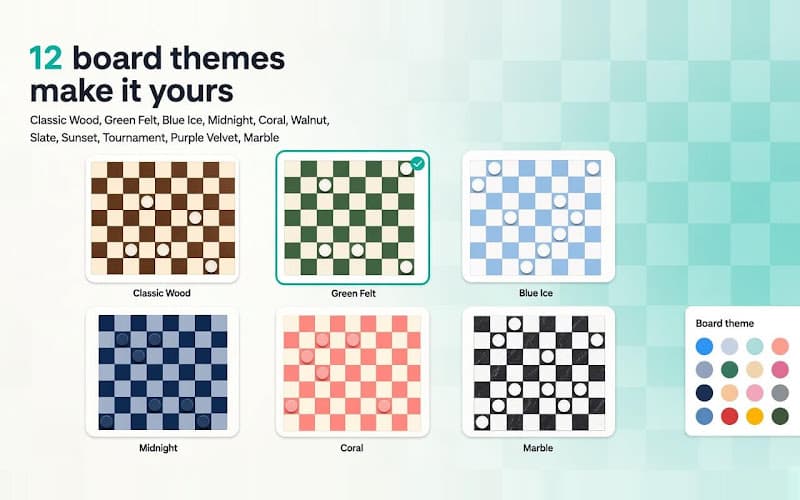
12 board themes and resilient online play
Personalize the board with twelve themes highlighted in the product promo: Classic Wood, Green Felt, Blue Ice, Midnight, Coral, Walnut, Slate, Sunset, Tournament, Purple Velvet, and Marble. Adjust settings such as who moves first so the look and feel stay familiar if you already use the website.
If the network blips mid-game, Checkers Online reconnects and can queue moves so play continues once you are back online. Unfinished games can be resumed from the popup - useful when you are on a flaky connection but still want a real match.
Guest play or account sync
Start as a guest in seconds, or sign in so nickname, rating, and progress stay with you across the extension and website. Sign in once on either side and continue where you left off. For cosmetics, history, and leaderboard tools, open the full site; keep the extension for fast toolbar play.
Privacy and permissions
The listing asks for storage (session and game data on your device), alarms (keep the live connection healthy and retry queued moves), and access only to https://checkers.happyvials.com for the API and realtime game server. The developer states there are no ads or third-party trackers inside the extension. Read the short policy at checkers.happyvials.com/extension/privacy. Chrome Web Store privacy disclosures also state data is not sold to third parties and is not used for unrelated purposes - always re-check the live listing.
How to install Checkers Online
- Open the Chrome Web Store page for Checkers Online and confirm the extension ID is kofpjedebkccdeooklpnoekdlboknamg.
- Click Add to Chrome, then confirm the install prompt.
- Pin the icon, open the popup, pick a ruleset and mode (Valera, friend invite, or matchmaking), and make your first move.
FAQ
Is this the same as offline American Checkers or International Draughts?
No. Checkers Online is the live multiplayer client with three rulesets, matchmaking, friend invites, and website sync. American Checkers and International Draughts are separate offline practice extensions.
Do I need an account?
No. You can start as a guest. Sign in when you want rating and progress synced with the website.
What is Valera?
Valera is the built-in bot opponent with skill levels from Beginner through Expert - useful when you want practice without waiting for matchmaking.
Where are shop, history, and leaderboard?
On the website. The extension focuses on fast play from the toolbar; open checkers.happyvials.com for the full shop, history, and leaderboard experience.
Get started
If you want online draughts with Russian, English/American, and International rules from Chrome, install Checkers Online, pin the icon, pick a theme, and start a live game. Explore more Chrome mini-games in AddonUp Games.