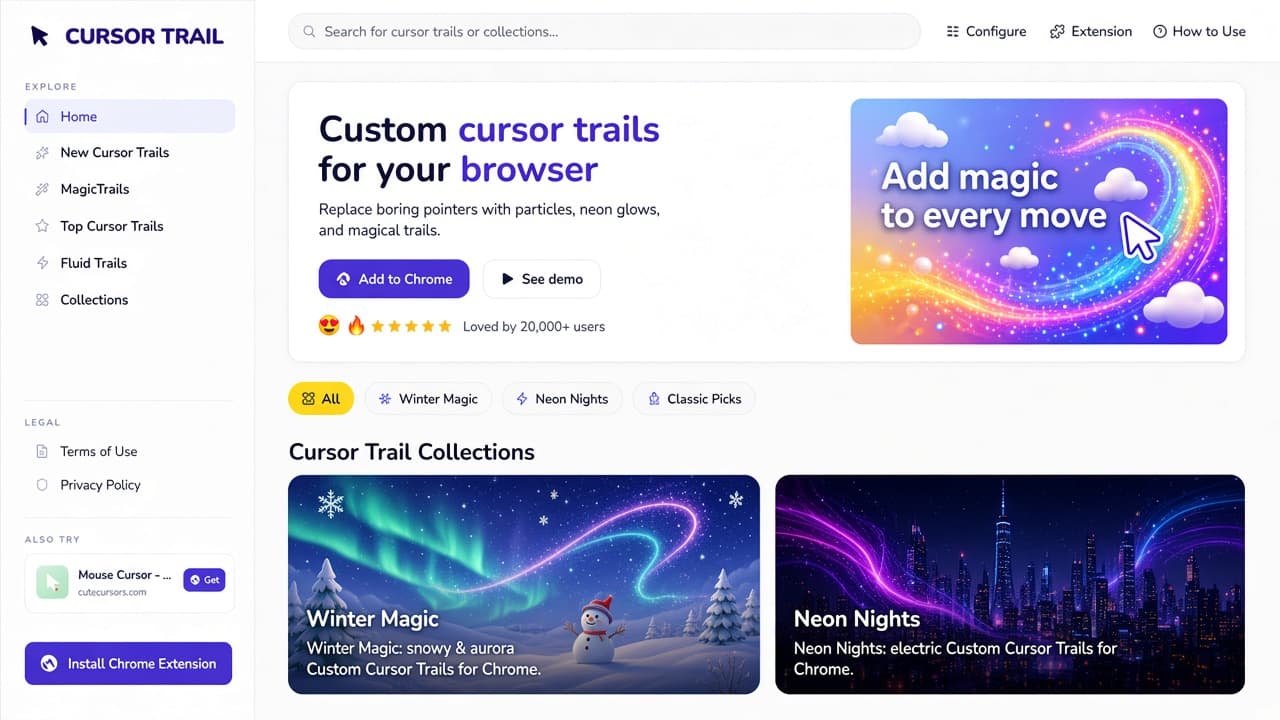
The Cursor Trail website is a live catalog of particle, neon, and fluid mouse trails for Chrome. On cursor-trail.com you preview effects in the page, open themed collections, then add a favorite to the Cursor Trail extension in one click. The document title is Cursor Trail - Fun Custom Cursor Trails for Chrome.
This is a dedicated catalog guide from an October 2026 visit. It is not a roundup, not a custom-cursor-trails.com article, and not a product-only post for the AddonUp slug cursor-trail-chrome. Those are different URLs and listings. Stay here if you want the cursor-trail.com site itself.
What cursor-trail.com is
The homepage H1 is Custom cursor trails for your browser. Hero copy: Replace boring pointers with particles, neon glows, and magical trails. Preview live on the site and add your favorites to Chrome in one click. A chip above the heading says Fun & cute cursor trails for Chrome. Trust line: Loved by 20,000+ users, with a five-star row.
Primary actions on cursor-trail.com are Add to Chrome and See demo. See demo opened Golden Particles on our visit. A promo carousel beside the hero rotated slides such as Add magic to every move and Explore beautiful cursor trail presets. Search sits in the header: Search for cursor trails or collections.
Footer claims match the pitch: Lightweight & Fast, Privacy Friendly, Regular Updates, Loved by 20K+ Users. Copyright on the visit: 2026 Cursor Trail. Contact on Support is [email protected]. The site does not require an account; extension preferences stay on the device, per the Support FAQ.
Explore nav, search, and category chips
Every page we opened kept the same left Explore column plus header quick links. Use that chrome to move without hunting:
- Home - hero, collection carousel, new trails, how-to strip.
- New Cursor Trails - /presets, 79 free presets with Add and Preview.
- MagicTrails - /magictrails, live canvas preview with no install required to explore.
- Top Cursor Trails - /presets/top, 8 trending presets.
- Fluid Trails - /collections/fluids, liquid neon and water streams.
- Collections - /collections, 13 curated groups.
- Configure, Extension, How to Use - header shortcuts to an edit page, Our Extensions, and Support.
Under the hero, a yellow All chip plus Winter Magic, Neon Nights, Classic Picks, Festive Sparkle, Golden Warmth, Audio Trails, Elements, Fluids, Interactive, Nature, Particles, Space, and Trails jump into those collections. New Cursor Trails uses a slightly tighter chip set (All, Audio, Elements, Fluids, Interactive, Nature, Particles, Space, Trails). Names overlap because many presets sit in more than one group.
Collections: 13 curated groups
The Collections H1 is Collections. Intro: 13 curated groups of custom cursor trail presets for Chrome - preview live and add to the Cursor Trail extension. Homepage cards highlighted five themes first: Winter Magic, Neon Nights, Festive Sparkle, Classic Picks, and Space.
Counts on the Collections grid during the visit (trails can appear in more than one group, so the unique catalog is 79, not the sum of cards):
- Winter Magic (5) - snowy and aurora trails; cozy frost presets. Example: Snowfall, Ember Aurora.
- Neon Nights (5) - electric neon fluids and RGB trails. Example: Fluid Neon, RGB Flow.
- Classic Picks (5) - timeless particle trails. Example: Golden Particles, Nova Drift, Color Flow, Shimmer Path.
- Festive Sparkle (5) - party confetti and sparkler presets. Example: Party Burst, Golden Confetti.
- Golden Warmth (1) - rich gold particles (Golden Particles intensity).
- Audio Trails (4) - notes and melody motion. Example: Melody Spark, Serenade, Note Stream, Melodrift.
- Elements (10) - fire and weather. Example: Bolt Stream, Rainfall, Fire Ascent.
- Fluids (3) - neon gas and water streams.
- Interactive (1) - responsive motion (Text Scatter).
- Nature (10) - petals and leaves. Example: Petal Breeze, Falling Leaves.
- Particles (21) - bokeh and glitter. Example: Bokeh Glow, Bokeh Breeze.
- Space (8) - aurora and nebula. Example: Ember Aurora, Nova Drift, Nebula Brush.
- Trails (14) - RGB, pixel, and circuit traces. Example: Ring Tail, PCB, Pixel Stream.
Open a collection when you already know the mood (frost, neon, party). Open All or search when you only remember a name. Each collection page repeats Add, Preview, and a jump back to the full catalog.
New Cursor Trails: 79 free presets
New Cursor Trails lists 79 free custom cursor trail presets for Chrome. Copy on that page: preview live, customize opacity and size, and install with the Cursor Trail extension. Cards show a still of the effect, a category (Audio, Elements, Fluids, Particles, and so on), a one-line blurb, then Add and Preview.
The homepage New Cursor Trails row is a shortlist, not the full 79. Names on that row during the visit, with the category the card printed:
- Golden Particles - Particles, also in Classic Picks.
- Fluid Neon - Fluids, also in Neon Nights.
- Bokeh Glow - Particles.
- Snowfall - Elements, also in Winter Magic.
- Ember Aurora - Space, also in Winter Magic.
- Nova Drift - Particles, also in Classic Picks.
- Color Flow - Particles, also in Classic Picks.
- Bolt Stream - Elements.
- Melody Spark - Audio, also in Audio Trails.
- Rainfall - Elements.
- Bokeh Breeze - Particles.
- Shimmer Path - Particles, also in Classic Picks.
The full /presets grid started with Audio (Melody Spark, Serenade, Note Stream, Melodrift) then Elements (Fire Ascent, Polygonal Flame) before mixing nature, space, and circuit styles. Some entries are intensity variants of a base trail (Golden Particles - Soft, Golden Particles - Bold, Fluid Neon - Intense, Snowfall - Gentle). Treat the list as a snapshot; new rows can land at the top.
MagicTrails: try 79 trails without installing
MagicTrails is the live-try page. Heading copy: Pick any of 79 trails and try it live in the preview - no install required to explore. Left column: the same category chips plus a scrollable list (Melody Spark selected first on our visit). Right column: a canvas that says Move your cursor to preview, then the selected trail name and Open trail page.
Use MagicTrails when you want motion, not a static thumbnail. The Support FAQ notes that some effects are heavier on real sites than in the sandboxed canvas, so a trail that looks calm in preview can feel denser after you Add to Extension. That is expected, not a broken install.
Top Cursor Trails
Top Cursor Trails showed 8 trending custom cursor trails for Chrome. Rankings change; on this visit the grid was Ember Aurora, Nova Drift, Color Flow, Bolt Stream, Golden Particles, Snowfall, Fluid Neon, and Bokeh Glow. Each card still had Add and Preview.
If you only have a minute, this page is the shortest path: eight popular looks, then Configure if you want a quieter opacity. Do not treat the order as a permanent leaderboard.
Fluid Trails
The Fluids collection heading is Fluids - Cursor Trail Collection. Blurb: liquid Custom Cursor Trails for Chrome. Neon gas and water stream presets on Cursor Trail. Stats on the page: 3 presets, type Fluids collection. Body copy says the set is built for modern minimal UIs, hypnotic motion, and smooth fluid aesthetics.
The three trails were Fluid Neon (also nested under Neon Nights), Water Stream, and Liquid Gravity. Buttons on the collection hero: Browse all trails, Fluids catalog, Add to Chrome. Related collections under the grid pointed back to Neon Nights, Winter Magic, Classic Picks, and Festive Sparkle. Fluid Neon also has an Intense variant in the full presets list.
How to use: four steps plus opacity, size, click burst
Home prints How to use Cursor Trail as four steps, and Support expands the same loop. Pin the extension after install so the toolbar icon stays visible.
- Install Extension - Add Cursor Trail from the Chrome Web Store in one click, then pin it from the toolbar puzzle menu.
- Open Trail Menu / Browse trails - Click the extension icon, or stay on cursor-trail.com and open any preset or collection.
- Add a Trail - Pick a trail from the site or popup. On a preset page, use Add to Extension. If the extension is missing, Support says a fallback can copy preset JSON to the clipboard.
- Configure It - Fine-tune opacity, size, and click burst so the effect matches the page instead of covering it.
The Customize Fluid Neon editor (header Configure pointed here on our visit) is the concrete settings UI. Heading: Adjust opacity, size, and click burst. Changes update the live preview instantly. Fields: Trail name, Effect dropdown (the same 79 names), Opacity slider (85% on the Fluid Neon default), Size slider (50), Click burst enabled checkbox, Save to browser, plus Add to Extension and View trail page.
Click burst is a burst of particles on click, not a second trail type. Turn it off if you click a lot on dense dashboards. Save to browser stores the tweak locally; Add to Extension pushes it into Chrome when the add-on is detected.
Chrome listing for this catalog
Install Chrome Extension, Add to Chrome, and Get Cursor Trail on Chrome Web Store all opened Cursor Trail by Cursor Trail (ID odehgmjejkmobcgagkjboedffoaljlhf). Our Extensions describes that listing as Chrome, Entertainment, v1.0.0: custom mouse effects and animated cursor trails, with presets from cursor-trail.com. Install from that store page, not from a random mirror.
AddonUp also files a similarly named product page at Cursor Trail for Chrome. That AddonUp slug is cursor-trail-chrome and is a separate Chrome Web Store ID from the catalog button above. Compare both listings if you are shopping trail extensions; this article stays on the cursor-trail.com website.
The team's Our Extensions page is a short directory that pairs the store listing with this catalog. Trails still do not replace the system cursor on chrome:// pages, the Web Store, or some nested frames. Reload a tab if a preview and the live page disagree.
Related tools the site mentions
An Also try sidebar rotates partner extensions. During the visit it showed Custom Cursor Pro with a custom-cursors.com Get chip, and Mouse Cursor (cutecursors.com). Those are pointer-skin catalogs, not trail engines. If you want a full custom-cursor library after you finish trails, custom-cursors.com is the related site the promo names. This post is not a Custom Cursor Pro review.
Do not mix this domain with custom-cursor-trails.com or cursor-trails.com. Those are other catalogs with other constructors, collections, and store IDs. Bookmark cursor-trail.com (singular trail) when you want MagicTrails, Fluids, and the 79-preset grid described here.
FAQ from Support
What is Cursor Trail?
Support's answer: a Chrome extension plus the cursor-trail.com catalog. Together they let you pick custom cursor trail effects, preview them in the browser, and apply settings in one click.
How do I add a preset from this website?
Open a preset page and click Add to Extension. When the extension is detected, the trail installs. If it is not, follow the on-page message to copy preset JSON.
Can I customize opacity and trail size?
Yes. Visit the edit page for any preset, move the sliders, watch the live preview, then add to the extension or save to browser storage. Click burst is the third control on that form.
Does Cursor Trail collect personal data?
Support says no account is required on the site and extension preferences stay on your device. Read the live Privacy Policy for local storage and third-party services. Contact: [email protected].
Where to start
- Open cursor-trail.com, try MagicTrails, or jump to a mood on Collections (Winter Magic, Neon Nights, Fluids).
- Shortlist from New Cursor Trails or Top Cursor Trails, then Preview on the preset page.
- Install Cursor Trail from the official Chrome Web Store button on the site, pin the icon, Add to Extension.
- Open Configure, set opacity, size, and click burst, Save to browser if you want a local copy.
On AddonUp, compare pointer and trail tools in Custom cursors and the extensions catalog. Use cursor-trail.com to preview this library; use the official Chrome listing the site links to install the extension that draws the trail.