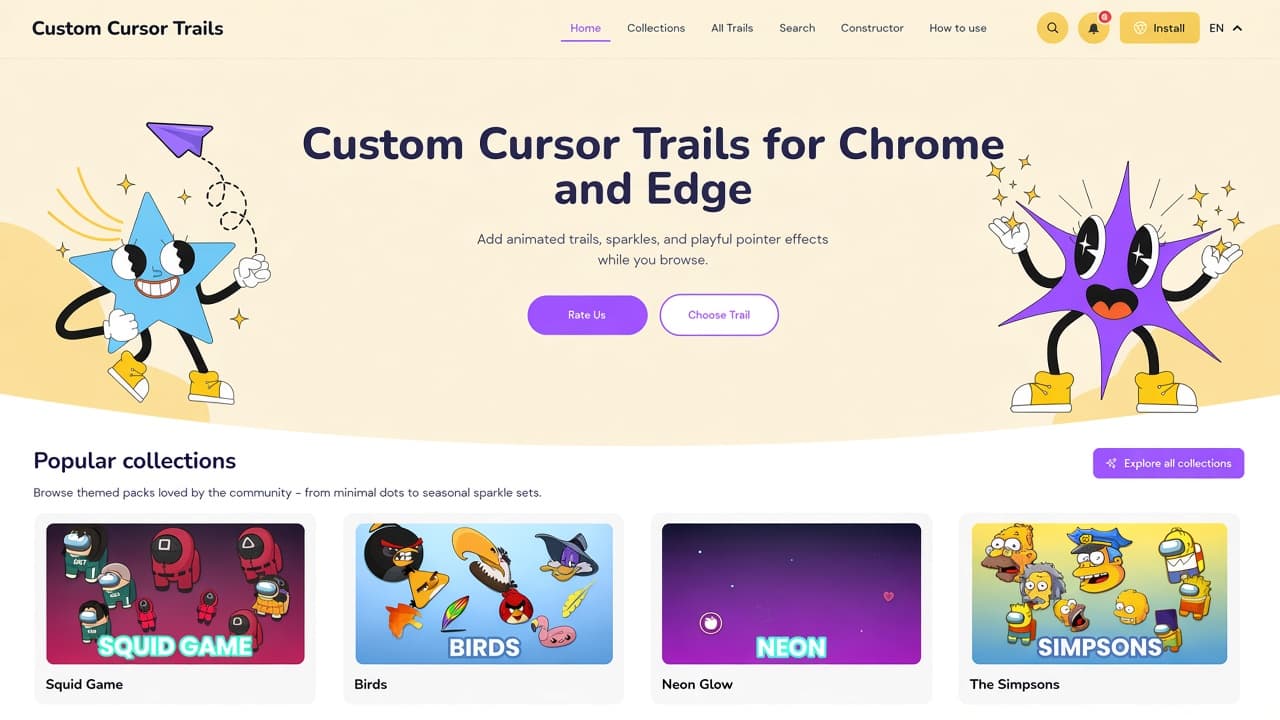
The Custom Cursor Trails website is the catalog behind animated pointer effects for Chrome and Edge, not just a Chrome Web Store card. On custom-cursor-trails.com you browse themed collections, open the full trail list, search by name, build a trail in Constructor, then install and tune the effect from the extension menu.
This is a dedicated tour of the live catalog as of October 2026. It is not a roundup of unrelated cursor tools. For the related AddonUp listing that also points at this site, see Custom Cursor & Cursor Trails. For more pointer add-ons, browse Custom Cursors.
What custom-cursor-trails.com is
The homepage title is Custom Cursor Trails - Animated Effects for Chrome & Edge. The hero says: Add animated trails, sparkles, and playful pointer effects while you browse. Two cartoon mascots sit in a cream banner: a smiling blue star with a paper airplane, and a purple spark burst. Primary actions are Rate Us and Choose Trail, plus a yellow Install control in the header.
The main nav is Home, Collections, All Trails, Search, Constructor, How to use, then search, notifications, Install, and a language switcher (EN on our visit). Footer groups cover Browser Extensions (install, rate, successful installation, complete uninstallation, updates), the catalog (all trails, search, my trails, collections, constructor), and Information (FAQ, troubleshooting, privacy, terms, cookie policy, disclaimer).
The catalog is for Chromium browsers. Chrome install goes to the Cursor Trails listing on the Chrome Web Store. Edge install is listed on Microsoft Edge Add-ons. FAQ on the site states Chrome 88+ and Edge 88+.
Popular collections: themed packs, not official merch
Home opens with Popular collections: Browse themed packs loved by the community - from minimal dots to seasonal sparkle sets. An Explore all collections button sends you to Cursor trail collections. The directory headline we saw: Showing 16 of 38 collections, with Newest/Oldest sort and pagination through page 3.
The popular row on Home (and Featured collections on the directory) used these themed packs on our visit:
- Squid Game: fan-style trails with Front Man, masked guards, and player looks for a bold browse.
- Birds: owls, ducks, chicks, eagles, and other winged pointers.
- Neon Glow: bright rings, electric stars, and luminous pointer effects.
- The Simpsons: Homer, Bart, Lisa, Marge, and Springfield favorites as unofficial fan art.
- Animals: foxes, birds, bunnies, and other wildlife.
- Weapons: swords, guns, blades, and battle-ready motion.
- Food & Sweets: donuts, cookies, snacks, and treat-shaped trails.
- Horror Games: spooky Poppy Playtime and Garten of Banban-style companions.
Further down the directory, Browse all collections mixed more fandom and aesthetic packs: Super Mario, VALORANT, Mortal Kombat, Fortnite, Labubu, Kawaii, The Wishes, and Dream SMP. Treat every character pack as fan art. Custom Cursor Trails is independent and is not affiliated with those games, shows, or brands.
Featured trails on Home
Featured trails are labeled as hand-picked designs the team likes right now. Cards include View, Add Trail, and a short description. On our visit the eight featured names were:
- Blue Star - a five-pointed star with bold neon follow.
- Ice Cube - a cube trail with bright sparkle.
- Red Star - a star trail with a soft twinkle.
- Green Cube - a cube trail for everyday shine.
- Pink Neon Star - pink neon stars with electric sparkle.
- Fall Leaf - a single falling leaf for autumn motion.
- Fall Glow - warm autumn glow accents.
- Snow Flakes - holiday-ready flake motion.
Those featured items live in collections such as Neon Glow, sparkles-and-twinkles, wind-and-autumn, and winter-and-christmas. The grid is a snapshot; Home can rotate.
All Trails and Search
All Trails at custom-cursor-trails.com/trails is the full library. The page we opened said: Browse 1089 custom cursor trails, covering minimalist lines, neon, pixel, and seasonal effects. Filter by color, style, or collection, preview, then Add Trail or View. Pagination ran through page 46.
The first page on our visit was a kawaii cat series (Midnight Star Cat, Strawberry Calico Cat, Cotton White Cat, Cocoa Spot Cat, and more) plus pastel jelly cubes. Each card uses a simple icon, a short blurb, yellow Add Trail, and View.
Search at custom-cursor-trails.com/search repeats the 1,089-trail library with filters by color, collection, or effect. Use it when you know a name such as Gold Sparkles or Fall Leaf. My Trails in the footer is where saved or built trails live after you use the extension.
How to use the extension
Home includes a four-step How to use the extension block. The How to use hub expands that into tutorials: install, use trails, Constructor, edit a trail, manage your trails, tips, keyboard shortcuts, troubleshooting, and FAQ.
- Open the extension menu. Click the Custom Cursor Trails icon in the toolbar to open the trail library and settings.
- Pick a trail. Scroll the list and click a design to apply it. Switch as often as you like.
- Tune the animation. Many trails let you adjust speed and density in extension settings.
- Turn it off. Open the menu and tap Turn Off to restore the default pointer. Refresh the tab if the change does not appear right away.
The how-to cards also cover favorites, removing trails, and when a site blocks cursor changes. If something breaks, start with troubleshooting before you reinstall.
Trending sparkles and stars
Home's Trending now row is labeled as what other users are trying this week. On our visit it was a sparkle-and-star set:
- Gold Sparkles
- Silver Sparkles
- Color Sparkles
- Blue Sparkles
- Glitter
- Color Glitter
- Gold Stars
- Silver Stars
These sit under sparkles-and-twinkles on the site. They are a good first install if you want motion without a character pack. Trending rotates, so treat the list as a snapshot, not a permanent ranking.
Constructor: build your own trail
Constructor at custom-cursor-trails.com/constructor is titled Custom Cursor Trail Builder. The pitch: combine colors, shapes, and particles, adjust duration and easing, preview, then add the effect for Chrome or Edge.
The builder we opened used three form steps plus a how-to sidebar:
- Trail name. Enter a title of 2-50 characters (placeholder: Cosmic Sparkles).
- Images. Paste an image URL, upload a file, or choose from your library. Formats listed: JPG, JPEG, PNG, WEBP, BMP, SVG. The page recommends transparent PNG or SVG, about 64-128 px, and files around 200-300 KB. Upload limit called out: at least one image, up to 5 MB.
- Settings. Pick an animation type (Flash, Wind, Storm, Gale, Gust, Rotation, Shake, Swing, and several directional scale/rotate options), easing (Linear, Ease, Ease-In, Ease-Out, Ease-In-Out), image size (32 px on the default slider), and effect duration (1,000 ms by default).
- Add trail to extension. Save, then select the new trail in the extension to use it on pages where the add-on can run.
Constructor FAQ notes that some image URLs fail because of CORS on the host, that you can edit an existing trail and click Save Changes, and that Size is pixel size while Duration is one animation cycle in milliseconds. You run one active trail at a time; switch from the menu instead of stacking effects.
FAQ, privacy, and fan-art disclaimer
The site FAQ at How to use / FAQ answers the questions that usually come up after install:
- Is it free? The FAQ says yes: no hidden fees, subscriptions, or premium walls for trails and customization.
- Which browsers? Chrome 88+ and Edge 88+.
- Performance? Trails are described as light; dense particle effects can use more CPU. Lower speed or density if a page feels heavy.
- Every website? Most sites work. Some pages block cursor changes for security. That is a site policy, not always an extension bug.
- Can I build my own? Yes, via Constructor.
- Uninstall? chrome://extensions or edge://extensions, then Remove. There is also a complete uninstallation guide on the site.
- One trail at a time? Yes. Switch instantly from the menu.
The FAQ also says the extension only changes cursor appearance and does not collect personal data, track browsing, or read page content. Read the live privacy policy, terms of use, and cookie policy on the official domain. The privacy page we opened (updated 6 October 2026) describes website analytics, cookies, and separate extension privacy docs. Prefer those pages over third-party copies.
Every major page we opened repeated a fan-art disclaimer in the footer: all cursor trails, artwork, and related visuals are created as fan art for fun and personalisation only. Custom Cursor Trails is an independent project and is not affiliated with, endorsed by, or sponsored by the owners of any named games, shows, characters, or trademarks. Use themed packs as unofficial decoration, not as licensed merch.
Install and start
A practical order if you are new:
- Install from the site's Chrome or Edge buttons (Chrome Web Store listing Cursor Trails, Edge add-on Cursor Trails).
- Open custom-cursor-trails.com, pick a featured trail such as Blue Star or a trending sparkle, and Add Trail.
- Tune speed and density in the toolbar menu. Turn Off if you need a plain pointer.
- When you want a custom look, name a trail in Constructor, add images, pick Flash or Wind, then add it to the extension.
If you want a related AddonUp product page for cursors plus trails, open Custom Cursor & Cursor Trails. To compare other pointer extensions, start at Chrome extensions and the Custom Cursors category.
Install from the official site, Chrome Web Store, or Edge Add-ons links that Custom Cursor Trails publishes. Check permissions on the store card, then enjoy sparkles that follow the pointer without pretending a fandom pack is official.