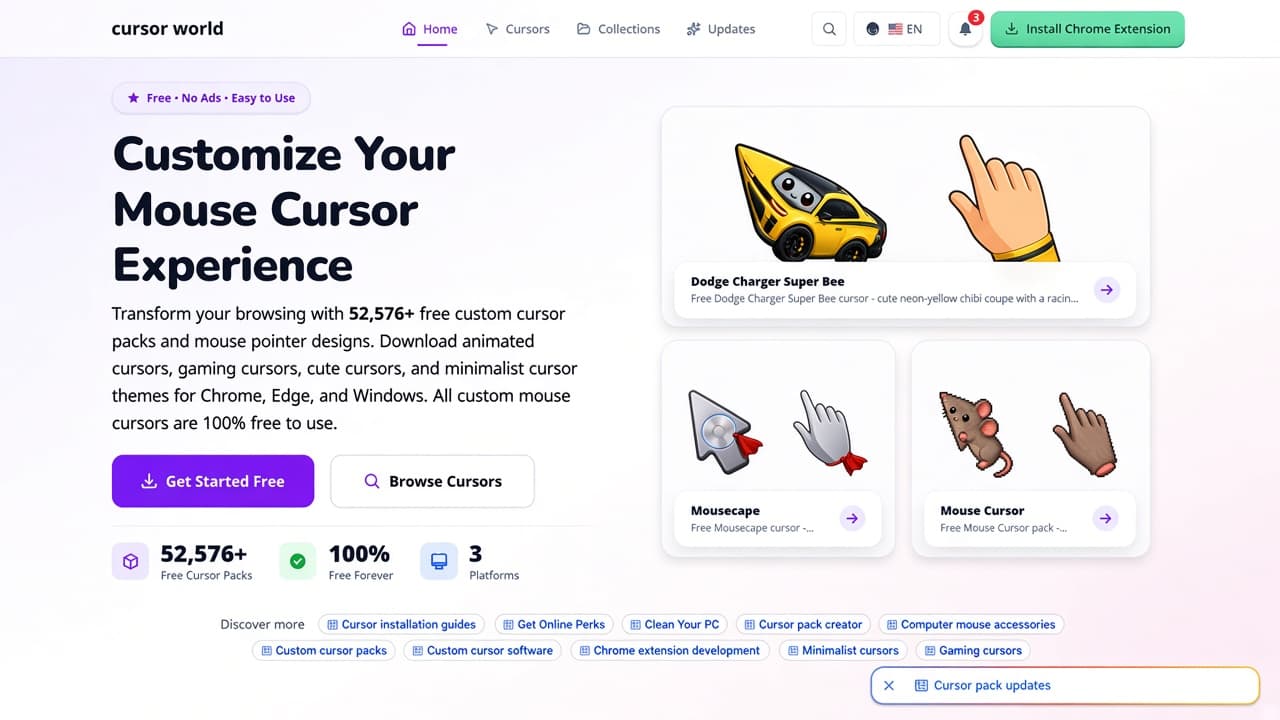
The Custom Cursor World website at custom-cursor.world is a large free cursor catalog for Chrome, Edge, and Windows. The live document title is Custom Cursor World - Free Mouse Cursors for Chrome, Edge & Windows. The hero line is Customize Your Mouse Cursor Experience, with a pill that reads Free, No Ads, Easy to Use.
This guide is a dedicated walkthrough of that catalog as of October 2026: Home, Cursors (the pack index at /packs), Collections, Updates, How It Works, FAQ, and the legal disclaimer. It is not a roundup of every cursor tool. It is also not a review of Cursor Helper, Custom Cursors Planet, or the AddonUp extension listing Cursor World (that extension is built around cursor-world.com, a different site).
If you want a broader comparison of pointer extensions, start from AddonUp custom cursors. Below we stay on custom-cursor.world.
What you land on at custom-cursor.world
The top bar is compact: a lowercase cursor world wordmark, then Home, Cursors, Collections, and Updates. Search is Ctrl+K or Cmd+K. A language switcher sits next to a notification bell and a green Install Chrome Extension button. Primary hero actions are Get Started Free and Browse Cursors.
When we reviewed the homepage, the hero counted 52,576+ free custom cursor packs, 100% Free Forever, and 3 platforms (Chrome, Edge, and Windows). Copy under the heading promises animated, gaming, cute, and minimalist themes, and states that all custom mouse cursors are 100% free to use. Treat the pack count as a live snapshot; the catalog grows weekly.
Hero preview cards on that visit showed Dodge Charger Super Bee (a neon-yellow chibi coupe plus racing-glove hand), Mousecape (silver Mac-style disk with a crimson cape), and Mouse Cursor (pixel gray rodent with a pink-ear pointing hand). Those cards rotate with new uploads.
Latest packs and the full catalog
Home then drops into Latest Custom Cursor Packs (Fresh Content). Each card pairs an arrow-style tip with a matching hand, a CUTE CURSORS chip, a collection folder, + Add, and View. The October 2026 snapshot included Dodge Charger Super Bee (Cars), Mousecape (Mac Custom Cursors), Mouse Cursor (Cute Cursors), Wii Cursors (Nintendo Wii), DeviantArt, Roblox Cursors, Custom Cursor Download, Jade Smash Gauntlet, Storm Hammer Gauntlet, Star Shield Gauntlet, Gold Arc Helm, and Slime Crystal Toca. A View All New Cursors button continues into the index.
The Cursors nav item opens custom-cursor.world/packs (All Custom Cursor Packs). The live index showed 52,576 matching packs, a collections filter (about 1,963 collections in that sidebar), Newest sort, and Grid or List view. Search packs from the bar. Filter by collection, including a large Cute Cursors bucket. Each row still uses + Add (Add to Extension) plus View Pack.
Lower on Home, Trending Custom Cursor Packs highlighted Axolotl, Portal Gun, San-X Kokoro Araiguma Scarf Cursor, Mousecape again, Bugcat Capoo Taking a Bath, Among Us Orange Cat Character, Strawberry Diver, Valorant Cursors, Minecraft Cursors, Roblox Cursors, SpongeBob Soccer Stance, and Castle Crashers Necromancer Pack. That row is popularity, not a ranking you should treat as permanent.
Collections, categories, and Updates
Home's Popular Custom Cursor Collections strip (Most Popular) showed Noragami, San-X, Regretevator, Castle Crashers, Terraria, two Valentine's Day sets, and Fandango, each with a star rating on the cover. Explore All Collections jumps to the full grid.
The Collections page at custom-cursor.world/collections counted 2,127 collections, 52,576 cursor packs, and 100% Free. Search collections, sort Newest, Popular, or Name, and page through a long catalog (pagination reached page 119 on our visit). Newest tiles included Strawberry Buddy, Blueberry Buddy, Pineapple Buddy, Gudetama, Butterflies, Vegetables, USA Houston, USA Dallas The Colony Grandscape, DeviantArt, Alley Cats, Fandango, Marvel Avengers Doomsday, McDonalds Happy Meal Hello Kitty, Letter Cursors, Cute Rocket Cursors, Voxel Critters, Voxel Bees, and Spiral Crystal Wands. Many covers are fan-style art; read the disclaimer before you treat any trademark as cleared.
Home also has Explore Custom Cursors by Category. The chips on our visit were niche tags rather than broad genres: Gemologist, AmongUsShow, Cyan, AnimalHospital, Secretary, Tie, Sheep, and Barrel, each marked 1+ packs, plus View All Categories. A Trusted by Thousands block describes a unified catalog of custom cursors from multiple sources, with counters for packs, collections, tags, free status, catalog sources, and platforms.
Nav Updates opens What's New. The page listed 16 total updates in three groups: new collections, extension updates, and community events. Dated notes from June to August 2025 mention an Easter collection, Gaming Heroes, a minimalist pack, extension versions through v2.0.1 (search, tags, performance), dark mode in v1.8, and a community milestone of 50,000 cursor packs. Use it as a changelog, then confirm live store version before you install.
Why the site pitches Custom Cursor World
The Why Choose Custom Cursor World? section lists six claims that match the rest of the product:
- Thousands of Custom Cursor Designs: animated, gaming, cute, minimalist, and 3D packs.
- Lightning Fast Installation: switch pointers in seconds with the Chrome or Edge extension.
- 100% Free Custom Cursors: no hidden costs, no subscriptions, no ads (the site's own wording).
- Multi-Platform Support: Google Chrome, Microsoft Edge, and Windows, with a Windows Guide in Help.
- Easy Cursor Customization: size, speed, and color in extension settings.
- Regular Cursor Updates: new packs added weekly.
How to install: four steps
Home's How to Install Custom Cursors block and the dedicated How It Works page share the same four-step flow. The help page adds a left rail (Overview, steps 01-04), plus Tips & Tricks, Troubleshooting, and FAQ.
- Install Extension: add Custom Cursor World to Chrome or Edge in one click (green Install Chrome Extension in the header).
- Browse & Choose: open packs or collections and pick a design.
- Customize: adjust size, speed, and color to match your style.
- Enjoy: switch between installed cursors anytime with a single click.
On a pack page the install control is Add to Extension (shown as + Add on cards). The extension applies the pointer on pages where custom cursors are allowed. Custom pointers often do not run on Chrome system pages, including the Chrome Web Store. Refresh tabs that were already open after you install. For desktop-wide pointers, use the Windows Guide linked from Help rather than expecting the browser add-on to restyle the whole OS.
FAQ from Home and How It Works
Home accordion answers (paraphrased from the live copy):
- Are custom cursors free? Yes. Packs are free to download and use, with no hidden costs, subscriptions, or ads on that FAQ answer.
- Which browsers support custom cursors? Google Chrome and Microsoft Edge, plus Windows via the installation guide.
- How do I install a custom cursor pack? Click Add to Extension on the pack. The add-on installs it; then switch designs from the extension.
- Can I customize my cursor settings? Yes: size, speed, and color in extension settings. Some packs also expose animation speed.
- Do custom cursors affect browser performance? The site says packs are lightweight with minimal impact on speed and memory, including when you keep several installed.
- Can I use multiple cursor packs at once? You can install many packs and switch among them from one list. You still use one active pointer at a time.
The longer FAQ at how-it-works/faq repeats those themes and adds: what a custom cursor is, whether cursors work on all websites, how often packs are added, and whether you can request a design. Related guides on that page point to Installation, Troubleshooting, and Tips & Tricks.
Fan art, user-generated content, and trademarks
Every footer we checked ends with two lines: Thousands of custom cursors, free for Chrome, Edge & Windows. Then Fan art for personal, non-commercial use. Trademarks belong to their respective owners. A second legal line states user-generated and third-party content, with links to Disclaimer and DMCA Policy.
The Disclaimer (last updated 26 July 2026) is the place to read the full rules. Custom Cursor World presents the site as a hosting and discovery platform. Packs may be user-uploaded, fan-created, or gathered from publicly available third-party sources. The operator does not claim ownership of third-party intellectual property. Product names, logos, characters, brands, and trademarks belong to their owners and are used for identification. No affiliation, sponsorship, or endorsement is implied. The disclaimer says the site does not warrant that packs are cleared for commercial use, redistribution, or anything beyond personal, non-commercial desktop or browser customization. Rights holders can use the DMCA procedure.
That is why many collection names look like games, studios, or brands. Treat them as fan pointers for personal browsing, not as official merch or a license to ship the art in your own product.
Start on the catalog
- Open custom-cursor.world and install the Chrome or Edge extension from the header.
- Browse All Custom Cursor Packs or a themed collection.
- Click Add to Extension, then set size, speed, and color in the add-on.
- Keep use personal and non-commercial, and check Disclaimer plus DMCA if you publish anything that ships the art.
For a different catalog that AddonUp already documented, see the Cursor Helper website. For the separate Cursor World Chrome extension (cursor-world.com packs), see Cursor World on AddonUp. More pointer tools live under extensions.