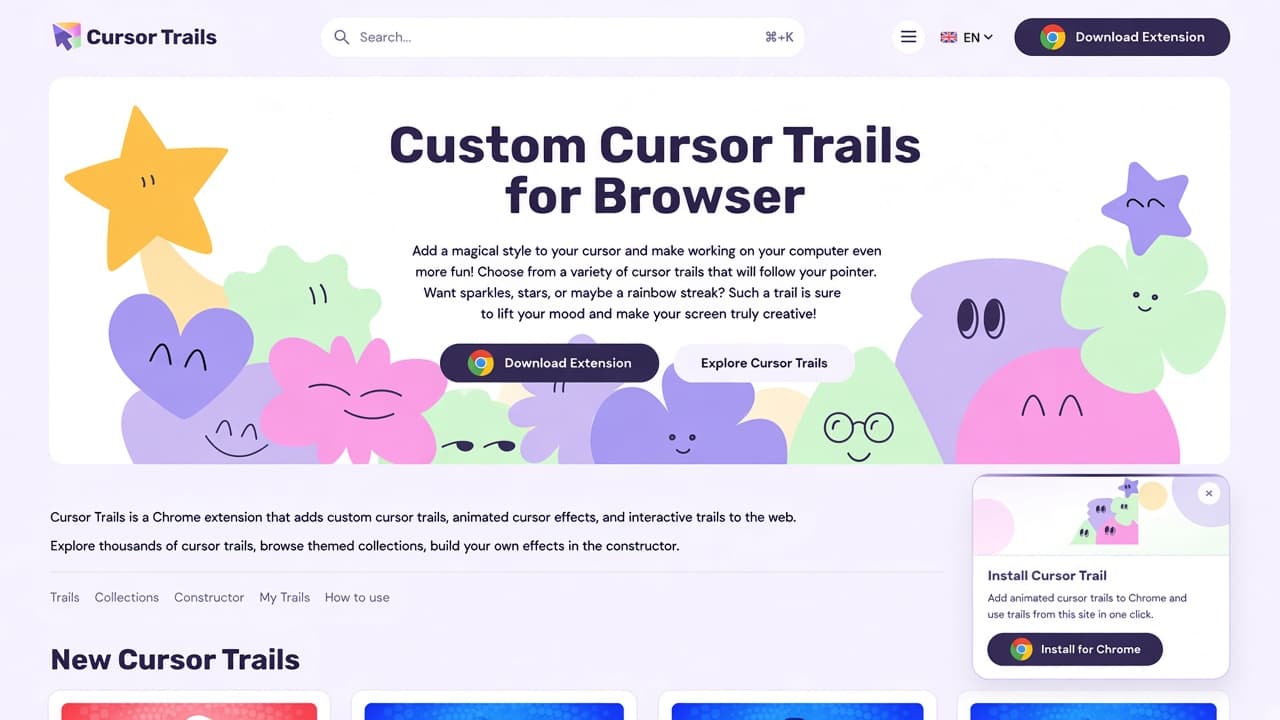
The Cursor Trails website is a catalog of animated mouse trails for Chrome, not only a Chrome Web Store listing. On cursor-trails.com you browse thousands of trails, open themed collections, design an effect in the Constructor, manage a list on My Trails, and install from Chrome in one click.
This guide walks the live site as of October 2026 (Home, Trails, Collections, Constructor, My Trails, How to use). It is a dedicated catalog article. It is not a roundup and it is not a product post for custom-cursor-trails.com or for cursor-trail.com even though the catalog's Download Extension button currently opens the Cursor Trail listing on the Chrome Web Store.
Homepage: magical trails, search, and Chrome install
The document title is Cursor Trails - Custom Cursor Trails for Browser. The hero H1 repeats Custom Cursor Trails for Browser. Body copy invites a magical cursor style: sparkles, stars, or a rainbow streak that follows the pointer so work in the browser feels more playful.
Under the hero, the site states that Cursor Trails is a Chrome extension for custom cursor trails, animated cursor effects, and interactive mouse animations while you browse. It then points you to thousands of trails, themed collections, the constructor, and one-click install of favorites.
Open cursor-trails.com to see that layout. A floating card titled Install Cursor Trail repeats the promise: add animated trails to Chrome and use trails from this site in one click, with Install for Chrome.
Chrome around the catalog is consistent on every main page:
- Search in the header, with a ⌘+K shortcut chip next to the field.
- Download Extension in the header (Chrome badge) plus Install for Chrome in the footer.
- Language control (EN on our visit).
- Main nav - Trails, Collections, Constructor, My Trails, How to use.
The install card can sit on top of the catalog. Close it if you need a clear view of trail cards. It is part of the live site, not an ad from AddonUp.
Trails: search, filters, and Add Trail
The Trails page is the full catalog. The H1 is Cursor Trails. Copy tells you to browse custom and animated mouse effects for Chrome, filter by collection, search by name, and add interactive effects in one click. It also mentions neon glow through minimal pointer styles in one list.
On our visit the catalog UI included:
- Breadcrumb Home > Trails.
- Collections sidebar with checkboxes (Incredibles, Teenage Mutant Ninja Turtles, Donut Country, and more).
- Search inside the sidebar plus the global header search.
- Sort chip set to New.
- Cards with art, a short blurb, and + Add Trail. Many cards also expose View and Configure.
New Cursor Trails on the homepage and the Trails grid were character-themed during the visit: Gargamel's Smurfs, Smurfette, Hefty Smurf, Brainy Smurf, plus Donut Country Emblem, Mira, BK, and Logo. Treat those as fan-art personalization for web pages. They are not official merch and they do not replace the system cursor on chrome:// pages.
Collections: fan-art themed packs
Collections uses the H1 Custom Cursor Trails & Cursor Effects Collections. The intro describes curated packs for Chrome: neon glow, particle trails, click effects, text cursor animations, interactive motion, and minimal styles, added in one click.
Popular collection links on Home and Collections matched. Describe them as fan-art themed packs inspired by well-known stories, not as licensed products. WhiteDev and the site are not affiliated with those owners. Examples from the live popular row:
- Incredibles - heroic-family adventure theme.
- Teenage Mutant Ninja Turtles (TMNT) - heroes-in-a-half-shell theme.
- Donut Country - playful holes-and-chaos world (the site also writes Donut County in some blurbs).
- Overwatch - heroes and battles theme.
- The Boss Baby - baby-as-boss cartoon theme.
- Peppa Pig - family cartoon theme.
- Miraculous - Ladybug and Cat Noir series theme.
- Shrek - ogre-quest movie theme.
The Browse collections grid also showed Frozen, The Fairly (Fairly OddParents-inspired), The Smurfs, and Madagascar on page 1, with New/Old sort and pagination through page 4. Trending trails on Home included Dragons: Rescue Riders names (Winger, Whiffy, Vizza, Splish, Zeppla, Burple, Aggro) and Winx Club: Bloom. Same rule: fan-art trails for browsing, not official merch.
Constructor: live preview and one-click add
The Cursor Trail Constructor heading is Cursor Trail Constructor. Copy: design custom trails with live preview, adjust animation type, colors, particles, and more, then add the trail to the Chrome extension in one click. Saved trails go to My Trails. A how to add a cursor trail link sits in the intro.
Customize your trail is a form. Trail Name defaulted to Trailing Cursor. Card Image and Trail Image showed a simple blue pointer tile. Type of Configurator listed these modes:
- Trailing Cursor
- Rainbow Cursor
- Fairy Dust Cursor
- Ghost Cursor
- Emoji Cursor
- Clock Cursor
- Following Dot Cursor
- Snowflake Cursor
- Springy Emoji Cursor
- Text Flag
- Bubble Cursor
- Multiple
Further controls include Size, Particles, and Rate (our snapshot showed sliders around 38, 14, and 0.3). Actions: Add Trail, Apply, Reset, plus a Preview Mode toggle (On). Build an original sparkle or emoji trail here if you do not want a character pack.
My Trails: per-profile list
My Trails is where trails saved in the Chrome extension should appear. The page says each browser profile shows its own list of installed trails and settings. Create a new effect in the Cursor Trail Constructor or browse the trails catalog for more designs.
Without the extension connected, the page still showed a Recommended trails carousel (same character-themed cards as Home), with Add Trail, View, and Configure. After install, use this page to configure or remove trails instead of hunting through the public catalog.
How to use: guides plus four popup steps
The How to Use Cursor Trails hub is a set of short guides: install, add trails from the site, use the popup, manage My Trails, and rate the extension on the Chrome Web Store.
- Install the extension - add Cursor Trails to Chrome from the Web Store in a few steps.
- Add cursor trails from the site - browse collections and packs on cursor-trails.com and add them to the extension.
- Use Cursor Trails - open the extension menu, pick a trail, adjust settings, turn effects on or off.
- Manage your trails - configure, remove individual cursors, or delete whole collections from My Trails.
- Rate the extension - leave a rating and review on the Chrome Web Store.
Home also prints 4 Easy Steps for Use that match the toolbar popup (the icon is described as a small trail of cursor movement):
- Cursor Trails menu - click the extension icon in the Chrome toolbar to open the popup.
- Setting the trail - in the popup, scroll and click the trail you want. You can pick another after you try the first.
- Changing animation - select your preferred animation in the extension settings and use the updated trail in the browser.
- Disabling Cursor Trails - return to default from the popup. You might need to reload the tab because of browser cache.
The add-from-site article How to add cursor trails from the site adds: use More cursors in the popup or open collections; click ADD ALL on a collection or ADD on a single pack; then pick the trail in the popup. Extra questions: [email protected].
Install for Chrome
Header Download Extension and footer Install for Chrome currently open Cursor Trail on the Chrome Web Store (ID olepgfgeagbdahhpodppmkenhejfhdcj). The floating card uses the same Install for Chrome action. Install only from that official listing, pin the icon, then return to cursor-trails.com to Add Trail.
On AddonUp, that store ID is filed as Cursor Trail. This article stays on the catalog site. A separate Cursor Trail product write-up is out of scope here.
Trails apply on regular websites. Chrome system pages, the Web Store, some PDFs, and nested frames often keep the default arrow. Reload tabs after you change or disable a trail.
Related Chrome tools the site lists
An Explore our Chrome extensions strip on Home promotes other free tools from the same team: custom cursors, YouTube extras, audio boosters, and idle clicker games. Named cards included Custom Scrollbar, Custom Cursor App, Custom Cursor App PRO, PiggyBank Money Clicker, Cursor Cat, Cursor Helper - Custom Cursor, Cursor Trails - Custom Cursor Trails, Cursor Trail, Custom Progress Bar for YouTube, Lil Rooster Money Clicker, Equalizer for Chrome Browser, Theme & Color Changer for YouTube, Volume Sound Booster, Cookie Clicker, and Pawsome Browser Kitties. That strip is a directory, not the reason to pick this catalog.
If you want pointer packs instead of trails, AddonUp has Cursor Helper. If you want cursors plus trails plus click effects on a different site (custom-cursor-trails.com), see Custom Cursor and Cursor Trails. Keep those as related tools. Do not treat cursor-trails.com as a substitute for those product pages.
Fan art, WhiteDev, and legal pages
Every major page we opened carried this notice: the content on the website is FanArt. Product names, logos, characters, brands, trademarks, and registered trademarks belong to their owners and are unrelated to WhiteDev. Character collections and trending trails are unofficial personalization. They are not affiliated merch.
The footer credits © 2017 - 2026, WhiteDev. Extra links: About, Contact, Our Chrome extensions, Reviews/Rate, Terms of Use, Cookie Policy, Privacy Policy, Disclaimer. The disclaimer page says site info is general, third-party links are not audited, and some links may be Amazon affiliates. Prefer those documents on cursor-trails.com over random mirrors.
Where to start
- Open cursor-trails.com, use Search (⌘+K), or jump to Trails.
- Pick a fan-art collection if you want a themed set, or open Constructor for an original sparkle, rainbow, or emoji trail.
- Install from the official Chrome Web Store button, pin the icon, Add Trail (or ADD ALL), then use the four popup steps.
- Manage or disable trails on My Trails; reload the tab if the old effect sticks.
On AddonUp, compare trail and cursor tools in Custom cursors and the extensions catalog. Use cursor-trails.com to browse this library; use the official Chrome listing to install the extension that actually draws the trail.