The MyMoneyRain website is a hub for fun browser games and Chrome extensions, not a single-product store page. The live title is Fun Browser Games to Play Online | MyMoneyRain. The pitch is clicker games, trending tools, fresh releases, and a Tried and Trusted shelf of classics.
This article is a dedicated tour of mymoneyrain.com as of October 2026: Home, Games, Extensions, About Us, and Support. It is not a cursor-catalog roundup. Product cards here stay on this hub. AddonUp extension links appear only when a matching slug already exists.
What MyMoneyRain is
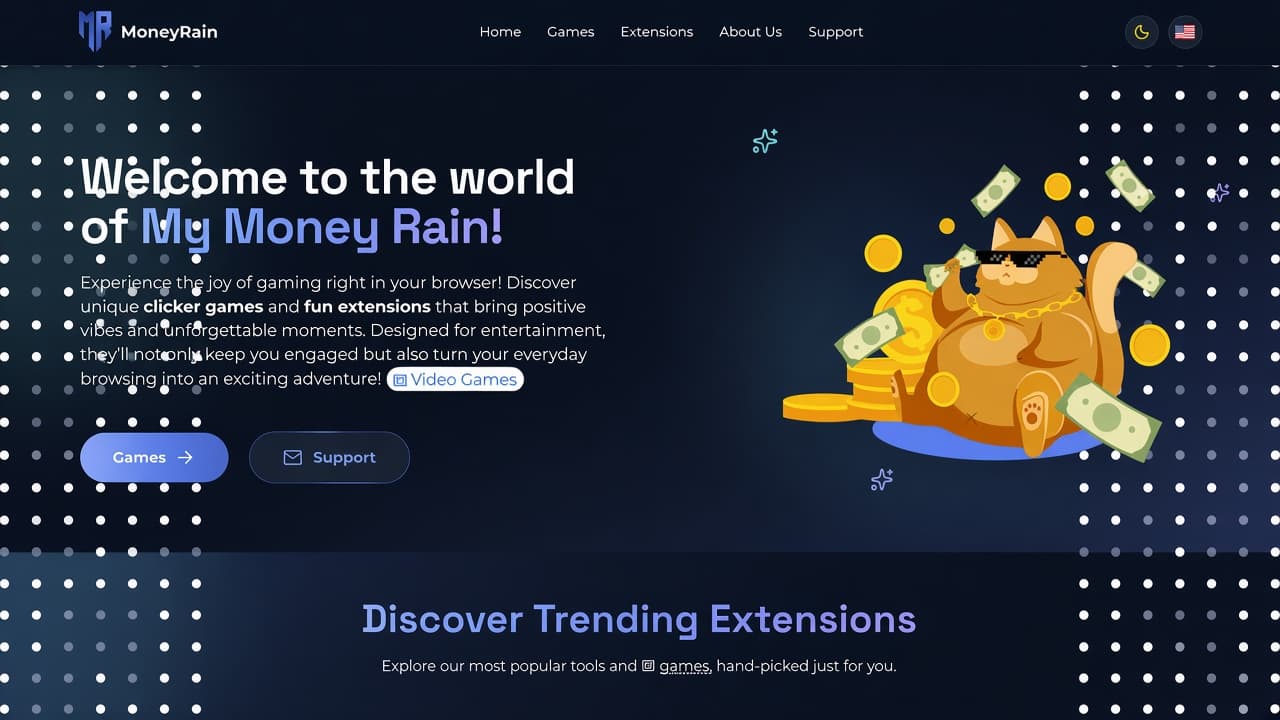
The homepage H1 is Welcome to the world of My Money Rain! Hero copy invites you to play unique clicker games and fun extensions in the browser, with Games and Support as the primary actions. The mascot is a golden cat in sunglasses on a coin pile, with floating bills and a dotted navy frame.
MyMoneyRain mixes idle clickers (cash, cookies, rap-empire jokes) with casual puzzles and browser tools: custom cursors, trails, dark mode, YouTube themes, and an audio equalizer. You can Play in the browser or Install from Chrome or Edge store links on each card.
How the site is organized
Main navigation is short. A theme toggle and a language flag sit on the right. Footer repeats the same destinations plus GamePix, a Money Rain page, social share, and legal docs.
- Home - hub sections and featured carousel (mymoneyrain.com).
- Games - full game grid at /games.
- Extensions - searchable catalog at /extensions.
- About Us - team, mission, and what they offer (/about).
- Support - FAQ, contact form, and email (/support).
Language options on the live site are English, Russian, Ukrainian, Spanish, and French (EN, RU, UK, ES, FR).
Homepage hero and Discover Trending Extensions
The hero sits on a deep navy field with white polka-dot columns. Subcopy highlights clicker games and fun extensions, then two pills: Games (arrow) and Support (envelope). Below the fold, Discover Trending Extensions introduces a featured carousel of popular tools and games, hand-picked on the homepage.
Carousel cards use large art, a Games badge when the item is a game, a short blurb, and Play plus Install. Arrows cycle the set. The homepage later splits the rest of the catalog into Trending Now, Fresh Off The Press, and Tried and Trusted.
Featured games on the homepage
The featured strip we captured on the live homepage (October 2026) includes these titles, with Play and Install on each card:
- Lil Rooster Money Clicker - Idle Game - start from nothing, click for cash, upgrade gear, and build a rap empire. AddonUp page: Lil Rooster Money Clicker.
- PiggyBank Money Clicker - Idle Game - grow an empty piggy bank, collect swag, and chase idle cash. AddonUp page: PiggyBank Money Clicker.
- Pawsome Browser Kitties - cats that follow the mouse (white, black, pink, Siamese, tiger, Tomas, and more). AddonUp page: Pawsome Browser Kitties.
- Catch the Cat - a board puzzle where you trap a cat by blocking tiles. AddonUp page: Catch the Cat Game.
- Tower Block - Casual game - stack blocks and try for the tallest tower (art titled Tower Blocks / Build the Tallest Tower). AddonUp page: Tower Block.
Trending Now
The Trending Now heading uses the line Our funniest clicker-style extensions that make your screen rain money. Cards on the live homepage were:
- Custom Cursor Helper - free custom mouse cursors for the web. AddonUp page: Cursor Helper.
- Custom Cursor Trail - a trail that follows the pointer. AddonUp page: Cursor Trail.
- Custom Cursor Trails - a sparkling star trail. AddonUp page: Custom Cursor Trails.
- PiggyBank Money Clicker - Idle Game - same idle cash game as in Featured.
- Cookie Clicker - bake cookies, unlock upgrades, idle loop. AddonUp page: Cookie Clicker.
- Cursor Cat - kittens chase the mouse across sites. AddonUp page: Cursor Cat.
Fresh Off The Press
The Fresh strip is labeled Brand-new clicker chaos - straight from the MyMoneyRain lab. On the live homepage it mixed new tools with games:
- Custom Dark Mode 3.0 - dark themes for sites such as YouTube, Facebook, and WhatsApp Web, toolbar toggle, more than 50 themes. AddonUp page: Custom Dark Mode.
- Pawsome Browser Kitties - also listed as a fresh cat-cursor drop.
- Sapper - Game - minesweeper-style grid, three difficulties, progress saving. AddonUp page: Sapper.
- Audio Equalizer - presets and EQ for YouTube and other audio. AddonUp page: Audio Equalizer - EQ.
- Cursor Trail - personalize a trail that follows the cursor. AddonUp page: Cursor Trail.
- Custom YouTube Styler - custom YouTube themes in Chrome. AddonUp page: Custom YouTube.
Tried and Trusted
Tried and Trusted is the classics row: Fan-approved classics that turn ordinary browsing into a money-fueled comedy. Live homepage cards:
- Custom YouTube Styler - YouTube themes, also in Fresh.
- Audio Equalizer - EQ presets, also in Fresh.
- BridgeMaster - arcade game Stick Hero - build bridges, clear levels. AddonUp page: BridgeMaster.
- Lil Rooster Money Clicker - Idle Game - the rap clicker returns as a trusted title.
- Tower Block - Casual game - stacking classic from Featured.
- Custom Dark Mode 3.0 - dark theme tool, also in Fresh.
Games catalog
The Games page title is Fun Games to Play | MyMoneyRain. The H2 is Click. Laugh. Repeat. Copy frames money-themed browser games: coins, comedy, and short sessions. Cards have Play and Install. A later H1, Money Rain Games, repeats that extensions and customizations stay in the browser.
The All Games grid we saw included the titles below, plus a Trending This Hour strip that repeats PiggyBank, Cookie Clicker, Catch the Cat, Lil Rooster, Minesweeper, and Catch the Cat Game.
- Sapper - Game, Tower Block, Catch the Cat Game, TicTacToe, BridgeMaster, Minesweeper for Google Chrome, Catch the Cat, Cookie Clicker, PiggyBank Money Clicker, Lil Rooster Money Clicker.
- Footer game shortcuts: PiggyBank: Money Clicker Idle, Lil Rooster: The Idle Clicker Game, Cookie Clicker: The Idle Clicker Game, Catch Cat: Clicker Game.
Extensions catalog
The Extensions page title is Chrome and Edge Extensions | MyMoneyRain. H1 Browser extensions explains that you install free Chrome and Edge add-ons, filter by category, search by name, and open a product page for how it works and store links. The live counter was 24 extensions, with Grid (default) and List views, plus pagination.
Search placeholder: Search extensions by name or description. First-page cards we captured included Audio Equalizer (Tools), BridgeMaster, Catch the Cat, Catch the Cat Game, Cookie Clicker, Cursor Cat, Cursor Trail, Custom Cursor App, Custom Cursor Helper, Custom Cursor Pro, Custom Cursor Trail, and Custom Cursor Trails.
- All - full list.
- Appearance - themes and look.
- Custom Cursors - pointers, cats, and trails.
- Games - playable add-ons.
- Tools - equalizer and similar utilities.
About Us
On About Us the H1 is About MyMoneyRain. They describe a team that builds browser games and extensions. Who We Are calls the project a digital entertainment company for idle clickers, puzzles, and productivity add-ons, naming PiggyBank: Money Clicker Idle and Catch Cat.
Our Mission: entertainment first, innovation driven, community focused. Core values: user-first, creativity, accessibility (core products described as free), and community. What We Offer splits Browser Games (no download, all devices) and Browser Extensions (privacy-focused, lightweight, cross-browser). Stats chips on the page: Regular Updates, High Quality, Community, Variety.
Support Center
The Support page title is Support Center - Get Help and Answers | MyMoneyRain. H1: We are Here to Help. Subcopy: Your Support Center - Get Answers, Solutions, and Expert Assistance. Primary buttons: Browse FAQs and Contact Us.
How Can We Help? offers FAQ, contact (typical reply within 24 hours on business days), and community. FAQ topics: install a browser extension (Chrome Web Store Add to Chrome, Edge Add-ons), games free to play, bug reports, personal data, no account required for most games, offline play after load with local progress, uninstall from Chrome or Edge. Contact includes a form (name, email, subject, message) and email [email protected].
Legal footer
The footer Legal column links Legal Overview, Privacy Policy, Terms of Use, Cookie Policy, and Disclaimer. Copyright on the live footer: 2026 MyMoneyRain. All rights reserved. Tagline: Create and be inspired, learn new things, support open standards.
How to start on MyMoneyRain
- Open mymoneyrain.com and pick Games or Support from the hero, or use the top nav.
- On a card, use Play for an in-browser session or Install for Chrome or Edge.
- To browse everything, open Games for clickers and puzzles, or Extensions and filter by Custom Cursors, Games, Tools, or Appearance.
- For install issues, use Support FAQs or the contact form. Read Privacy, Terms, Cookie Policy, and Disclaimer before you install.
Start on mymoneyrain.com. For related AddonUp listings, browse Chrome extensions when you want the same titles on this catalog.
Frequently asked questions
Is MyMoneyRain only clicker games?
No. Idle clickers (PiggyBank, Lil Rooster, Cookie Clicker) sit next to puzzles (Catch the Cat, Sapper, TicTacToe), arcade (Tower Block, BridgeMaster), and tools (cursors, trails, dark mode, YouTube styler, equalizer).
Do I need an account?
Support FAQ says most games play without registration. Progress can save locally. An account is optional when the product offers it.
Are the games free?
Support copy says games and core extension features are free. Optional cosmetics may exist on some titles. Confirm on the product page and store listing.
How is this different from a cursor catalog site?
MyMoneyRain is a mixed hub: money-themed clickers plus fun extensions. Cursor Helper, trails, and similar tools appear as cards here. Dedicated cursor-catalog websites are separate products with their own blogs.