Custom Themes for YouTube™ icon

Custom Themes for YouTube™

Custom Themes for YouTube™

Verified & Safe to Install
addonup.com/extensions/custom-themes-for-youtube
Custom Themes for YouTube™ screenshot

About This Extension

Transform the Look of YouTube™ - Your Style, Your Rules

YouTube™ is more than just a video platform. It’s where we learn, relax, get inspired, work, laugh, explore new ideas, and stay connected to the world.

Millions of people spend hours every day on YouTube™ - watching creators, streaming music, studying tutorials, or diving into deep content marathons.

But here’s a simple question:

Why should your YouTube™ look exactly like everyone else’s?

With Custom Themes for YouTube™, you can completely transform the appearance of YouTube™, including dark mode - and make it truly yours.

Complete Visual Customization

Custom Themes for YouTube™ gives you full control over the visual design of YouTube™. You’re no longer limited to the default light and dark modes. Instead, you can personalize almost every visual element:

  • Background colors
  • Navigation bar
  • Buttons and icons
  • Text colors
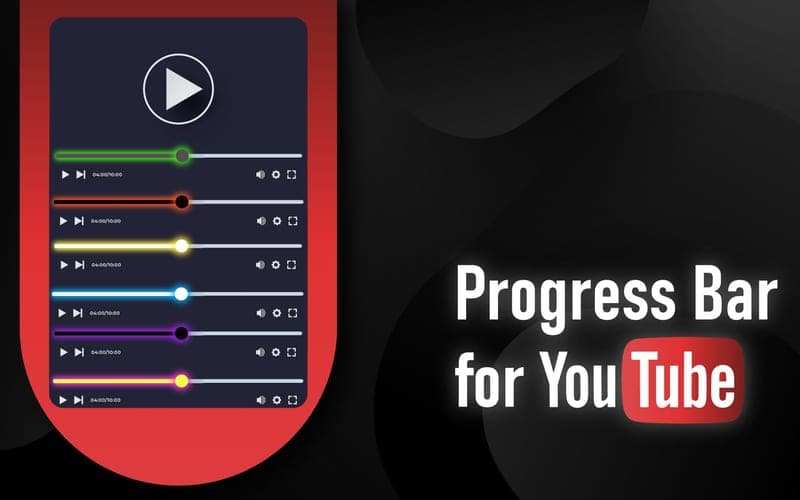
  • Progress bar
  • Sidebar
  • Comment section
  • Video thumbnails
  • Accent colors
  • Fonts and contrast levels

Create a clean minimalist workspace, a deep AMOLED dark experience, a colorful neon interface, or a soft pastel aesthetic.

Whether you prefer subtle elegance or bold creativity - it’s all possible.


Your YouTube™ experience should reflect your personality.

Advanced Dark Mode - Redefined. The default dark mode on YouTube™ is good - but it’s basic.

Custom Themes for YouTube™ takes dark mode to the next level with enhanced customization options:

  • True black AMOLED-friendly background
  • Adjustable contrast
  • Optimized text readability
  • Reduced glare
  • Softer tones for night viewing
  • Custom accent colors

If you watch YouTube™ at night, work in low-light environments, or simply prefer darker interfaces, this feature will dramatically improve your comfort.

Less eye strain.

Better focus.

More immersive experience.


🚀 Instant Changes - No Hassle

You don’t need design skills or technical knowledge. Custom Themes for YouTube™ is designed for simplicity:

  1. Install the extension.
  2. Open YouTube™.
  3. Choose a ready-made theme or create your own.
  4. Enjoy your new interface instantly.

Changes apply immediately - no page reload required. It’s fast, smooth, and intuitive.

🎭 Ready-Made Themes for Every Mood

Don’t feel like customizing everything manually? No problem.

Choose from a variety of professionally designed themes:

  • Midnight Black
  • Ocean Blue
  • Neon Glow
  • Sunset Orange
  • Minimal White
  • Cyberpunk Mode
  • Soft Pastel
  • Classic Dark Pro

Each theme is carefully crafted to balance aesthetics with usability, ensuring comfortable reading and seamless navigation. Switch themes depending on your mood, time of day, or workflow.

Perfect for Work & Study

Many people use YouTube™ for education, online courses, research, and productivity. The right interface can significantly improve focus.

Custom Themes for YouTube™ allows you to:

  • Use calm, neutral tones for concentration
  • Reduce visual distractions
  • Improve text clarity
  • Adjust brightness for long sessions
  • Create a cleaner, distraction-free environment

Turn YouTube™ into a productivity-friendly workspace.

Upgrade Your YouTube™ Experience

YouTube™ stays the same powerful platform you love - but now it looks exactly the way you want it to.

  • Make it darker.
  • Make it brighter.
  • Make it softer.
  • Make it bold.
  • Make it yours.

Custom Themes for YouTube™ - Redefine Your YouTube™ Experience.

More Інструменти Extensions

Discover more extensions from the same category

About Custom Themes for YouTube™

Що це за розширення?

Custom Themes for YouTube™

Ключові Функції

This extension provides a range of features designed to improve your productivity and browsing experience. Whether you're looking to enhance functionality, improve security, or add new capabilities to your browser, Custom Themes for YouTube™ has you covered.

Як Встановити

Встановлення цього розширення швидке та просте. Просто натисніть кнопку 'Встановити Розширення' вище, і розширення буде автоматично додано до вашого браузера. Ви можете почати використовувати його одразу.

Всі розширення в нашій колекції безпечні для встановлення та були перевірені на якість та безпеку. Ви можете керувати встановленими розширеннями через сторінку керування розширеннями Chrome.

Популярні категорії: